My tmux setup
I run everything from a single Ghostty window. No tabs, no tiling window manager, no split terminal app. Just tmux. Every project gets its own session, every process gets its own window, and I switch between them faster than most people switch browser tabs.
This post is part of my terminal workflow series.
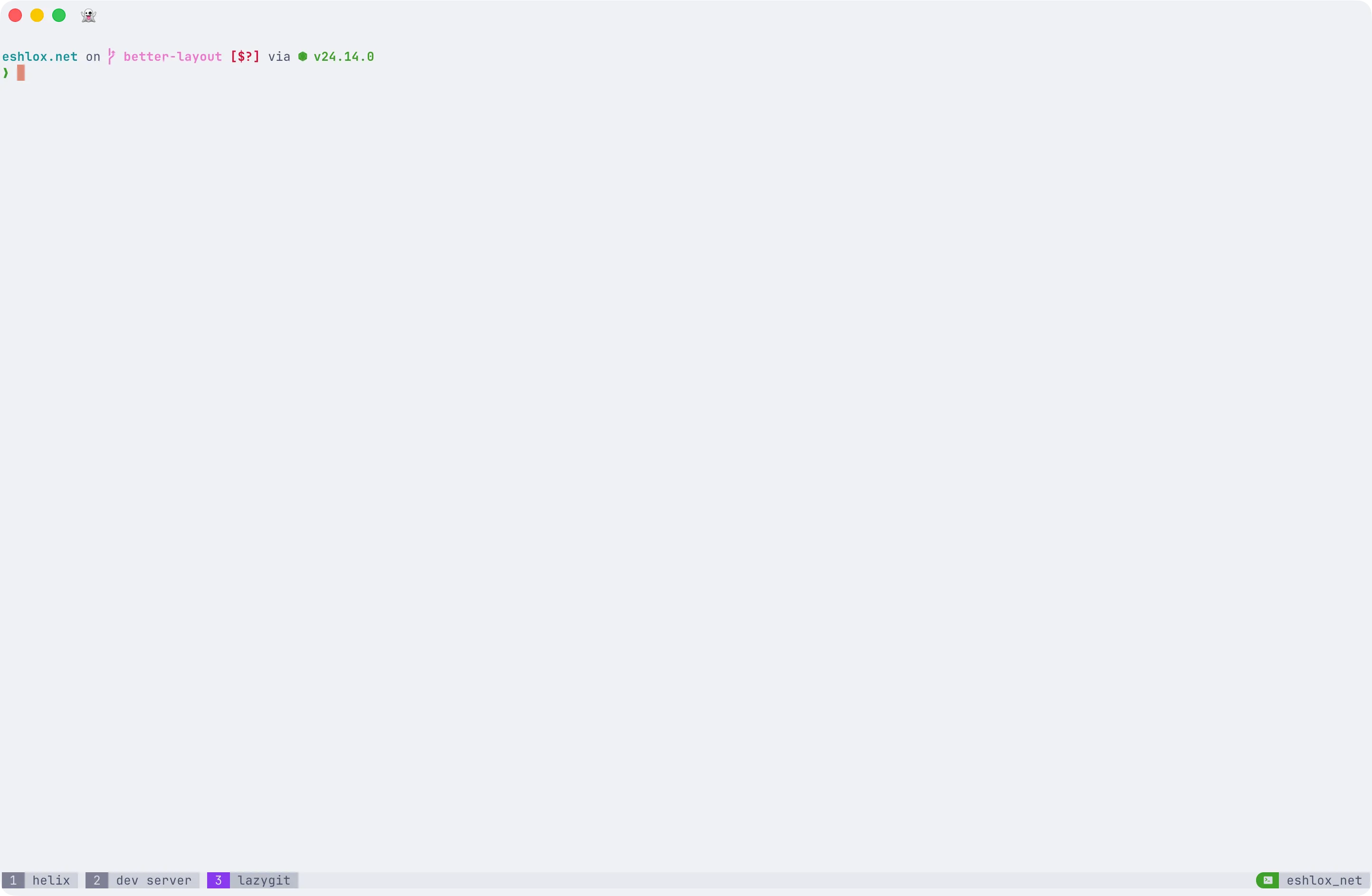
The philosophy: session = project, window = process
The core idea is simple. Each tmux session maps to a project I am working on. Inside that session, each window is a dedicated process:
Session: project-1  ├── 1: helix        (editor)  ├── 2: claude       (Claude Code)  ├── 3: codex        (OpenAI Codex)  ├── 4: dev          (dev server)  └── 5: lint         (linters watch)
Session: project-2  ├── 1: helix  ├── 2: claude  └── 3: dev
Session: project-3  ├── 1: helix  └── 2: dev
I jump between projects with Option+H and Option+L. I jump between processes with Option+1 through Option+9. No prefix key needed for either. It is instant.
When I am done for the day, I detach and everything stays alive. Tomorrow morning I reattach and every project is exactly where I left it. Editor state, running servers, log output, all of it.
The terminal: Ghostty
I use Ghostty as my terminal emulator. It is fast, it handles true color and undercurl properly, and it gets out of the way. I do not use Ghostty tabs or splits. tmux handles all of that. One Ghostty window, fullscreen, that is it.
Three lines in my Ghostty config (~/.config/ghostty/config) make this workflow possible:
shell-integration = zshcommand = /bin/zsh -l -c "/opt/homebrew/bin/tmux new-session -A -s main"macos-option-as-alt = leftcommand = ...tmux new-session -A -s mainlaunches tmux automatically when I open Ghostty. It attaches to mymainsession (or creates it if it does not exist). I never interact with a terminal outside of tmux.macos-option-as-alt = leftmakes all myOption+numberandOption+H/Lbindings work. By default, macOS intercepts Option to type special characters. This tells Ghostty to pass the left Option key through as Alt, which tmux sees asM-(Meta). I set it toleftinstead oftrueso I can still use right Option for Polish diacritics.shell-integration = zshenables Ghostty shell integration features like command tracking and jump-to-prompt.
The glue: Caps Lock as Ctrl in Ghostty
I have a separate post about my full Caps Lock setup, but here is the part that matters for tmux.
I use hidutil to remap Caps Lock to F18 (a key that does not physically exist on Apple keyboards), then Hammerspoon intercepts F18 and gives it three behaviors:
- Tap sends Escape (for Helix, lazygit, vim-style workflows)
- Double tap toggles Caps Lock
- Hold + letter switches to an app (outside Ghostty) or acts as Ctrl (inside Ghostty)
When Ghostty is the frontmost app, Caps Lock acts as Ctrl. This means:
- Caps Lock + Space =
Ctrl+Space= tmux prefix - Prefix, then Caps Lock + N = prefix +
Ctrl+N= next window (repeatable without re-pressing prefix) - Caps Lock + C in copy mode = cancel
Tap for Escape still works in Ghostty too, which is great for Helix.
The config, annotated
Here is my complete ~/.config/tmux/tmux.conf, broken down section by section.
Prefix key
set -g prefix C-Spaceunbind C-bbind C-Space send-prefixI use Ctrl+Space as my prefix instead of the default Ctrl+B. A quick note on how this works: the prefix is not a three-key chord. You tap Ctrl+Space, release, then tap the action key. Two separate keystrokes.
On Mac, Ctrl sits in the bottom-left corner, which makes Ctrl+Space a bit of a reach. My solution: I remap Caps Lock to act as Ctrl when Ghostty is the frontmost app. Caps Lock is right on the home row, so the prefix becomes effortless.
Essentials
set -g mouse onset -g base-index 1setw -g pane-base-index 1set -g renumber-windows onset -g history-limit 50000set -s escape-time 0set -g detach-on-destroy offset -g set-clipboard onset -g focus-events onThe important bits:
base-index 1means windows start at 1, not 0. This matches the keyboard layout (Option+1goes to window 1).renumber-windows onmeans if I close window 2 out of 5, the remaining windows become 1-2-3-4 instead of 1-3-4-5. No gaps.escape-time 0means zero delay after pressing Escape. Essential for Helix and Vim. Without this, pressing Escape feels sluggish.detach-on-destroy offmeans when I kill the last window in a session, tmux switches to another session instead of detaching. I never accidentally drop out of tmux.history-limit 50000gives generous scrollback. When a build fails 2000 lines ago, I can still find it.
True color and undercurl
set -g allow-passthrough onset -g default-terminal "tmux-256color"set -ag terminal-overrides ",xterm-256color:RGB"set -ag terminal-overrides ",xterm-ghostty:RGB"set -as terminal-overrides ',*:Smulx=\E[4::%p1%dm'set -as terminal-overrides ',*:Setulc=\E[58::2::%p1%{65536}%/%d::%p1%{256}%/%{255}%&%d::%p1%{255}%&%d%;m'This section makes Ghostty + tmux + Helix play nicely together. The RGB overrides enable true 24-bit color. The Smulx and Setulc lines enable undercurl (the wavy underline used for diagnostics in Helix) and colored underlines. The allow-passthrough enables clipboard integration and the Kitty image protocol to work through tmux.
If your terminal shows weird blocks instead of colored squiggly lines under errors, these two lines are what you are missing.
Window navigation (prefix-free)
bind -n M-1 select-window -t 1bind -n M-2 select-window -t 2bind -n M-3 select-window -t 3bind -n M-4 select-window -t 4bind -n M-5 select-window -t 5bind -n M-6 select-window -t 6bind -n M-7 select-window -t 7bind -n M-8 select-window -t 8bind -n M-9 select-window -t 9Option+number switches windows instantly, no prefix needed. This is the single most-used binding in my config. Option+1 for editor, Option+2 for Claude, Option+3 for dev server. Muscle memory takes over after a day.
Session navigation (prefix-free)
bind -n M-h switch-client -pbind -n M-l switch-client -nOption+H and Option+L cycle through sessions (vim-style: H for previous, L for next). Since each session is a project, this is how I context-switch between projects. Combined with prefix+s for the full session picker (with preview), I can always get where I need to be in one or two keystrokes.
Window and split management
bind -r C-n next-windowbind -r C-p previous-windowbind -r C-a last-windowbind c new-window -c "#{pane_current_path}"bind \\ split-window -h -c "#{pane_current_path}"bind - split-window -v -c "#{pane_current_path}"unbind %unbind '"'New windows and splits inherit the current working directory (#{pane_current_path}). Without this, every new window drops you in $HOME, which is never what you want.
The -r flag on C-n and C-p makes them repeatable. Hold prefix, then tap Ctrl+N multiple times to skip through windows without re-pressing the prefix.
Pane navigation
bind h select-pane -Lbind j select-pane -Dbind k select-pane -Ubind l select-pane -RVim-style pane movement. prefix+h/j/k/l instead of arrow keys. I do not use splits heavily (windows are usually enough), but when I do, these feel natural.
lazygit popup
bind g display-popup -d "#{pane_current_path}" -w 90% -h 90% -E "lazygit"prefix+g opens lazygit in a floating popup that covers 90% of the screen. When I quit lazygit, the popup disappears and I am right back where I was. This is one of my favorite tmux features. Popups are temporary overlays, not persistent windows cluttering up my window list.
Copy mode (vi-style)
setw -g mode-keys vibind v copy-modebind -T copy-mode-vi v send -X begin-selectionbind -T copy-mode-vi y send -X copy-selection-and-cancelprefix+v enters copy mode. Then v to start selecting, y to yank. Standard vi muscle memory. Combined with set-clipboard on, yanked text goes straight to the system clipboard.
Config reload
bind R source-file ~/.config/tmux/tmux.conf \; display-message "Config reloaded!"prefix+R reloads the config without restarting tmux. Essential when you are tweaking settings.
Theme: Catppuccin Latte
set -g @catppuccin_flavor 'latte'set -g @catppuccin_window_text " #W"set -g @catppuccin_window_current_text " #W"run ~/.config/tmux/plugins/catppuccin/tmux/catppuccin.tmux
set -g status-position bottomset -g status-right-length 100set -g status-left-length 100set -g status-left ""set -g status-right "#{E:@catppuccin_status_session}"
I use Catppuccin Latte, a light theme. The status bar is minimal: window names on the left, session name on the right. No clock, no hostname, no battery. Just what I need to orient myself.
Preserve window names
setw -g automatic-rename offset -g allow-rename offBy default, tmux renames windows based on the running process. If I name a window “dev” and then run node server.js, tmux would rename it to “node”. These two lines prevent that. When I create a window called “helix”, it stays “helix”.
Shell helpers
I have two small functions in my .zshrc:
t() { tmux new-window -n "${1:-shell}"; }ts() { tmux new-session -A -s "${1:-main}"; }t devcreates a new window named “dev” in the current sessionts project-1attaches to the “project-1” session if it exists, or creates it
ts is how I start my day. I run ts project-1, then ts project-2, then ts project-3. Each one either reconnects to yesterday’s session or starts fresh.
The full config
For easy copy-pasting, here is everything.
Ghostty (~/.config/ghostty/config)
shell-integration = zshcommand = /bin/zsh -l -c "/opt/homebrew/bin/tmux new-session -A -s main"macos-option-as-alt = lefttmux (~/.config/tmux/tmux.conf)
# Prefix: Ctrl+Spaceset -g prefix C-Spaceunbind C-bbind C-Space send-prefix
# Basicsset -g mouse onset -g base-index 1setw -g pane-base-index 1set -g renumber-windows onset -g history-limit 50000set -s escape-time 0set -g detach-on-destroy offset -g set-clipboard onset -g focus-events on
# Passthrough (clipboard, image protocol)set -g allow-passthrough on
# True color (Ghostty + Helix)set -g default-terminal "tmux-256color"set -ag terminal-overrides ",xterm-256color:RGB"set -ag terminal-overrides ",xterm-ghostty:RGB"set -as terminal-overrides ',*:Smulx=\E[4::%p1%dm'set -as terminal-overrides ',*:Setulc=\E[58::2::%p1%{65536}%/%d::%p1%{256}%/%{255}%&%d::%p1%{255}%&%d%;m'
# Window switchingbind -r C-n next-windowbind -r C-p previous-windowbind -r C-a last-windowbind c new-window -c "#{pane_current_path}"
# Splitsbind \\ split-window -h -c "#{pane_current_path}"bind - split-window -v -c "#{pane_current_path}"unbind %unbind '"'
# Pane navbind h select-pane -Lbind j select-pane -Dbind k select-pane -Ubind l select-pane -R
# Lazygit popupbind g display-popup -d "#{pane_current_path}" -w 90% -h 90% -E "lazygit"
# Copy modesetw -g mode-keys vibind v copy-modebind -T copy-mode-vi v send -X begin-selectionbind -T copy-mode-vi y send -X copy-selection-and-cancel
# Reloadbind R source-file ~/.config/tmux/tmux.conf \; display-message "Config reloaded!"
# Catppuccin Latteset -g @catppuccin_flavor 'latte'set -g @catppuccin_window_text " #W"set -g @catppuccin_window_current_text " #W"run ~/.config/tmux/plugins/catppuccin/tmux/catppuccin.tmux
# Status barset -g status-position bottomset -g status-right-length 100set -g status-left-length 100set -g status-left ""set -g status-right "#{E:@catppuccin_status_session}"
# Keep window namessetw -g automatic-rename offset -g allow-rename off
# Option+number = switch window (no prefix)bind -n M-1 select-window -t 1bind -n M-2 select-window -t 2bind -n M-3 select-window -t 3bind -n M-4 select-window -t 4bind -n M-5 select-window -t 5bind -n M-6 select-window -t 6bind -n M-7 select-window -t 7bind -n M-8 select-window -t 8bind -n M-9 select-window -t 9
# Option+H/L = switch session (no prefix)bind -n M-h switch-client -pbind -n M-l switch-client -n
Shell helpers (~/.zshrc)
t() { tmux new-window -n "${1:-shell}"; }ts() { tmux new-session -A -s "${1:-main}"; }For a full keyboard shortcut reference, see the tmux cheatsheet.
Why this works
The key insight is that navigation should never require thinking. Option+2 is always my Claude window. Option+H takes me to the previous project. prefix+g opens lazygit. There is no cognitive overhead. My hands know where to go.
The session-per-project model also means I never accidentally cross-pollinate. My project-1 dev server does not end up in the same window list as my project-3 editor. Each project is a self-contained workspace.
And because tmux sessions persist, I can walk away from my computer for a week, come back, run ts project-1, and everything is exactly as I left it. Running servers, log output, cursor position in the editor. All of it. That is the real superpower.
If you want to automate session startup, check out my post on tmuxinator.
Spot something wrong?
Found a typo, a broken link, or something that could be better? I would love to hear from you. Drop me a message and I will fix it.