lazygit: a better way to use Git
I used WebStorm for years. It is a great IDE with solid TypeScript support and a built-in Git UI that works. But after spending time optimizing my terminal workflow with tmux, Ghostty, and delta, I realized WebStorm Git integration was actually the slowest part of my workflow. So I gave lazygit a proper try.
What is wrong with WebStorm Git?
Nothing, really. It is fine. But “fine” is the problem.
WebStorm Git UI does everything through dialogs, dropdowns, and mouse clicks. Want to interactive rebase? Click, click, scroll, click. Want to stage a single hunk? Right-click, navigate the context menu, click. It works, but every action requires you to leave your keyboard and break your flow.
The bigger issue is context switching. You are deep in code, you want to quickly commit, and suddenly you are in a completely different mental mode. Navigating a GUI, waiting for panels to load, clicking through confirmation dialogs. It is death by a thousand clicks.
What is lazygit?
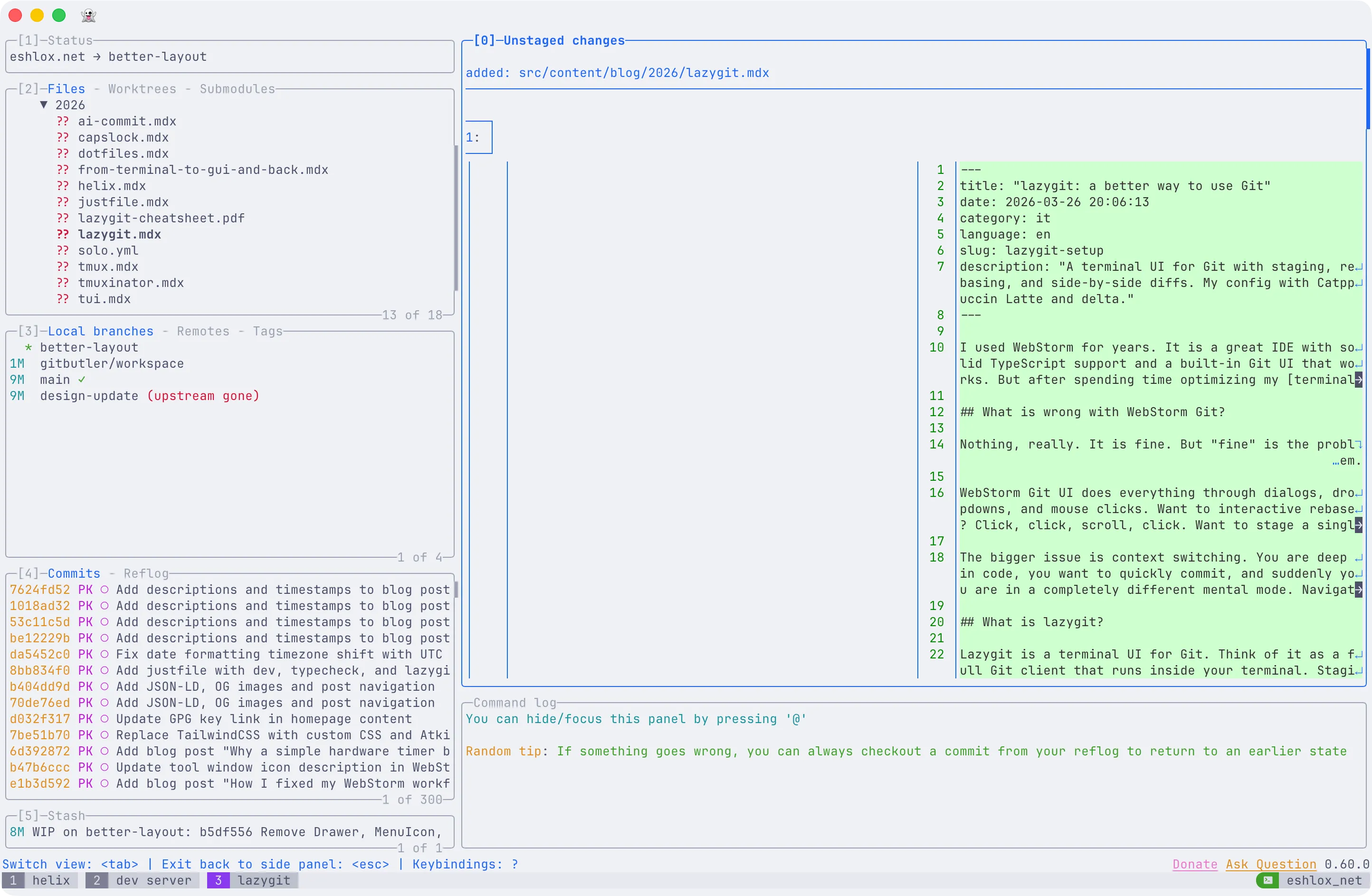
Lazygit is a terminal UI for Git. Think of it as a full Git client that runs inside your terminal. Staging, committing, branching, rebasing, cherry-picking, stashing, resolving conflicts. All through keyboard shortcuts in a panel-based interface.
It is written in Go, so it is fast. Really fast. It starts instantly, navigates instantly, and every operation is a keystroke or two away.
The key insight is that lazygit gives you the visual feedback of a GUI (you see diffs, branches, logs, stash, all at once) with the speed of the command line. You never leave your terminal. You never reach for the mouse.
This post is part of my terminal workflow series.
How it works
Lazygit is organized into five main panels that you navigate with number keys or Tab:
- Status (1) - repo info, recent repos
- Files (2) - working directory changes, staging
- Branches (3) - local branches, remotes, tags
- Commits (4) - commit log, rebase operations
- Stash (5) - stashed changes
You move between panels, select items with arrow keys (or j/k), and perform actions with single-key shortcuts. Press space to stage a file, c to commit, P to push. Need to interactive rebase? Navigate to a commit, press e to edit, s to squash, f to fixup. Done.
The real power is in how fast you can chain operations. Stage three files, commit with a message, push. All in about 3 seconds without thinking about it.
My setup: Catppuccin Latte + delta
I run a light terminal theme (Catppuccin Latte in Ghostty), so I configured lazygit to match. I also use delta as my pager for beautiful side-by-side diffs with syntax highlighting.
Here is my full config.yml:
git: autoFetch: false pagers: - colorArg: always pager: delta --light --paging=never --side-by-sidegui: theme: lightTheme: true activeBorderColor: - "#1e66f5" # Blue - bold inactiveBorderColor: - "#9ca0b0" # Overlay0 optionsTextColor: - "#1e66f5" # Blue selectedLineBgColor: - "#ccd0da" # Surface0 selectedRangeBgColor: - "#ccd0da" # Surface0 cherryPickedCommitBgColor: - "#bcc0cc" # Surface1 cherryPickedCommitFgColor: - "#1e66f5" # Blue unstagedChangesColor: - "#d20f39" # Red defaultFgColor: - "#4c4f69" # Text searchingActiveBorderColor: - "#df8e1d" # YellowA few notes on this config:
autoFetch: false - I disabled auto-fetch because I prefer to fetch manually. In a multi-remote setup with several environments, auto-fetch can be noisy and slow.
Delta integration - The --light flag tells delta to use a light color scheme matching Catppuccin Latte. --side-by-side gives you a split diff view that makes reviewing changes much easier. --paging=never is important because lazygit handles its own scrolling.
Catppuccin Latte colors - Every color in the theme maps to a specific Catppuccin Latte palette token. The active border is Catppuccin Blue (#1e66f5), unstaged changes use Red (#d20f39) so they are immediately visible, and the background selections use Surface0 (#ccd0da) for subtle highlighting.
For a full keyboard shortcut reference, see the lazygit cheatsheet.
tmux integration
In my tmux setup, I have a shortcut (prefix+g) that opens lazygit in a floating popup that covers 90% of the screen. When I quit lazygit, the popup disappears. It does not clutter my window list, and I do not need a dedicated lazygit window.
You can also generate commit messages with AI using a custom lazygit command that sends the diff to Claude.
The verdict
Switching to lazygit was one of those changes where the improvement is immediately obvious. My Git workflow is faster, I stay in the terminal, and the keybinding-driven interface means I barely have to think about it anymore. Combined with delta for beautiful diffs and Catppuccin for a consistent light theme, it is the best Git experience I have had.
If you are a terminal-heavy developer still reaching for your IDE Git UI, give lazygit a try.
Spot something wrong?
Found a typo, a broken link, or something that could be better? I would love to hear from you. Drop me a message and I will fix it.