Solo changed how I work with terminals
I use terminals a lot. Running AI agents, Docker containers, dev servers, tunnels, tests, linters. On a typical day, I have three to seven projects open at the same time. Not just code, but dev servers, background services, and CLI tools running alongside.
The problem
I tried to manage all of that inside WebStorm. It works, but on a single 16-inch MacBook Pro screen, it gets crowded fast. I have the code editor, the file tree, multiple terminal tabs, AI tools, and I am constantly switching between them. Every panel takes space, and with multiple projects open, it becomes hard to keep track of what is running where.
Then I tried Ghostty with tabs and split windows. It was better, but I still had to switch between Ghostty and WebStorm all the time. The context switching was the same problem, just in a different shape.
I looked at other tools. cmux, Air from JetBrains, Wave Terminal, tmux-based setups, and similar projects. Some of them looked promising, and I started testing a few. But then I found something else.
Solo
Solo is a lightweight terminal dashboard built by Aaron Francis. The idea is simple: you group processes into projects and manage everything from a single window.
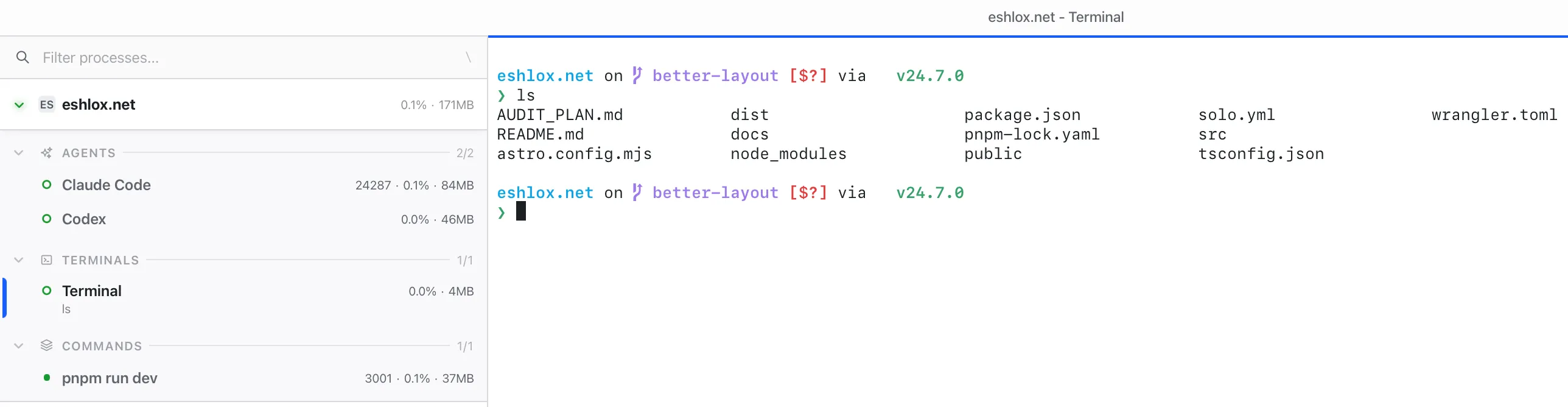
For example, I can create a project and add two AI agents (Claude Code and Codex), a dev server, a queue service, Docker Compose, and a linter running in watch mode. Then I can open a regular terminal for git operations. All of this appears in a sidebar as a tree, grouped by type: agents, terminals, and commands. Each process shows a status indicator, whether it is running or not, plus CPU and memory usage.
What makes it really useful is the solo.yml file. I can define my entire project setup in a YAML config and commit it to the repository. The next time I start working on that project, I click one button, and everything starts. All servers, all agents, all commands. One click and it is ready.
I have a project where I usually need eight terminal tabs with different dev servers. Every time I close the terminal or restart the computer, I have to open those tabs again and run all the commands manually. With Solo, I open it, click start, and everything is running.
MCP integration
Solo has MCP (Model Context Protocol) support, which means AI agents running inside Solo can access logs and process status from other windows in the project. For example, I can ask Claude Code to check the dev server logs after completing a task to verify that everything works. The AI can see what is happening across the entire project, not just in its own terminal.
Fast and stable
Solo is built with Tauri, so it is native and lightweight, around 25MB. It uses the system’s WebKit instead of bundling Chromium like Electron apps. I have been testing it for a few days now, and I have had zero issues. It is fast, responsive, and does not eat my RAM.
Why it works for me
It sounds like a simple tool. Group some processes, show their status, start, and stop them. But after using it for a few days, I realized how much time I was wasting on managing terminals.
I always have this idea that I should configure open source tools to build the perfect setup. Tmux with custom scripts, process managers, terminal multiplexers. But I never have time for that. So I choose something that works out of the box. This is the same reason I use WebStorm instead of spending weeks configuring Neovim. I want to get work done, not configure tools.
With Solo, I have all my projects with their servers, agents, and commands in a single window. I see what is running and what is not. I get desktop notifications when something crashes. On the Pro plan, I can easily start or stop an unlimited number of processes with a single click. Auto-restart handles crashed services, so I do not have to babysit them.
It is a huge time saver, and it really simplifies my daily workflow.
My current setup
I use Solo for managing all my processes and AI agents, and WebStorm for coding and working with git. I still love Ghostty as a terminal, but I do not use it full-time anymore. Solo replaced most of what I was doing there.
Good to know
Solo is currently macOS only, with Windows and Linux coming later. There is a free tier that includes up to 3 projects and 20 processes, which is enough to try it properly. The Pro plan is $99 for the first year and $69/year after that, with unlimited projects and processes.
One thing to keep in mind: when you close Solo, all processes stop. So if you need something running in the background after closing the app, you will need to handle that separately.
It also has keyboard-driven navigation and a command palette, which is nice if you prefer not to click around.
What is next
I really recommend trying Solo. I have no sponsorship, no affiliation. I just like the product. I could not find a better tool for this, and it does exactly what I need.
Now I am thinking about whether I still need WebStorm. Most of my work happens in Solo and the terminal. Maybe it is time to try Zed or Neovim with Lazygit. I am not sure yet. But let’s see.
Spot something wrong?
Found a typo, a broken link, or something that could be better? I would love to hear from you. Drop me a message and I will fix it.