just: a simple command runner
I have adopted tools and abandoned them more times than I can count. Editors, terminals, deployment platforms. The cycle never ends. But just clicked from day one.
This post is part of my terminal workflow series.
What is just?
just is a command runner. That is it. No build system, no dependency graph, no DAG of tasks. You write a justfile in the root of your project, define recipes (basically named commands), and run them with just <recipe>. Think of it as make without the baggage: no tabs-vs-spaces nonsense, no implicit rules, no pretending your project is a C compiler pipeline from 1977.
It was built by Casey Rodarmor specifically to be a command runner and nothing else. That focus is what makes it great.
Why I like it
It replaces the “how do I run this again?” problem. Every project has a handful of commands you run constantly: start the dev server, run migrations, deploy to staging, seed the database. After a week away from a project, I would forget the exact flags and arguments. Now I just open the justfile and everything is there.
It works across all my projects. I jump between an AdonisJS backend, a React Native app, infrastructure managed through OpenTofu, and a few side projects. Each one has a justfile. The mental model is always the same: open terminal, type just, see what is available.
It is not trying to be smart. There is no plugin ecosystem, no config format wars, no YAML. Recipes are essentially shell commands with a thin layer of variables and dependencies on top. When something breaks, you can read the justfile and immediately understand what happened.
It has sane defaults. Recipes fail on first error (like set -e). Variables are explicit. You can set a default shell per recipe. It loads .env files. These are all things I would have to wire up manually in a Makefile.
The choose command: a TUI for free
This is the feature that made me actually enjoy running project commands. Instead of typing just <recipe> and hoping you remember the name, you run:
just --chooseThis pipes all your recipes into a fuzzy finder (uses fzf by default) and lets you pick one interactively. It sounds simple, but it completely changes the workflow. Instead of reading the justfile to find the right command, you just fuzzy-search it.
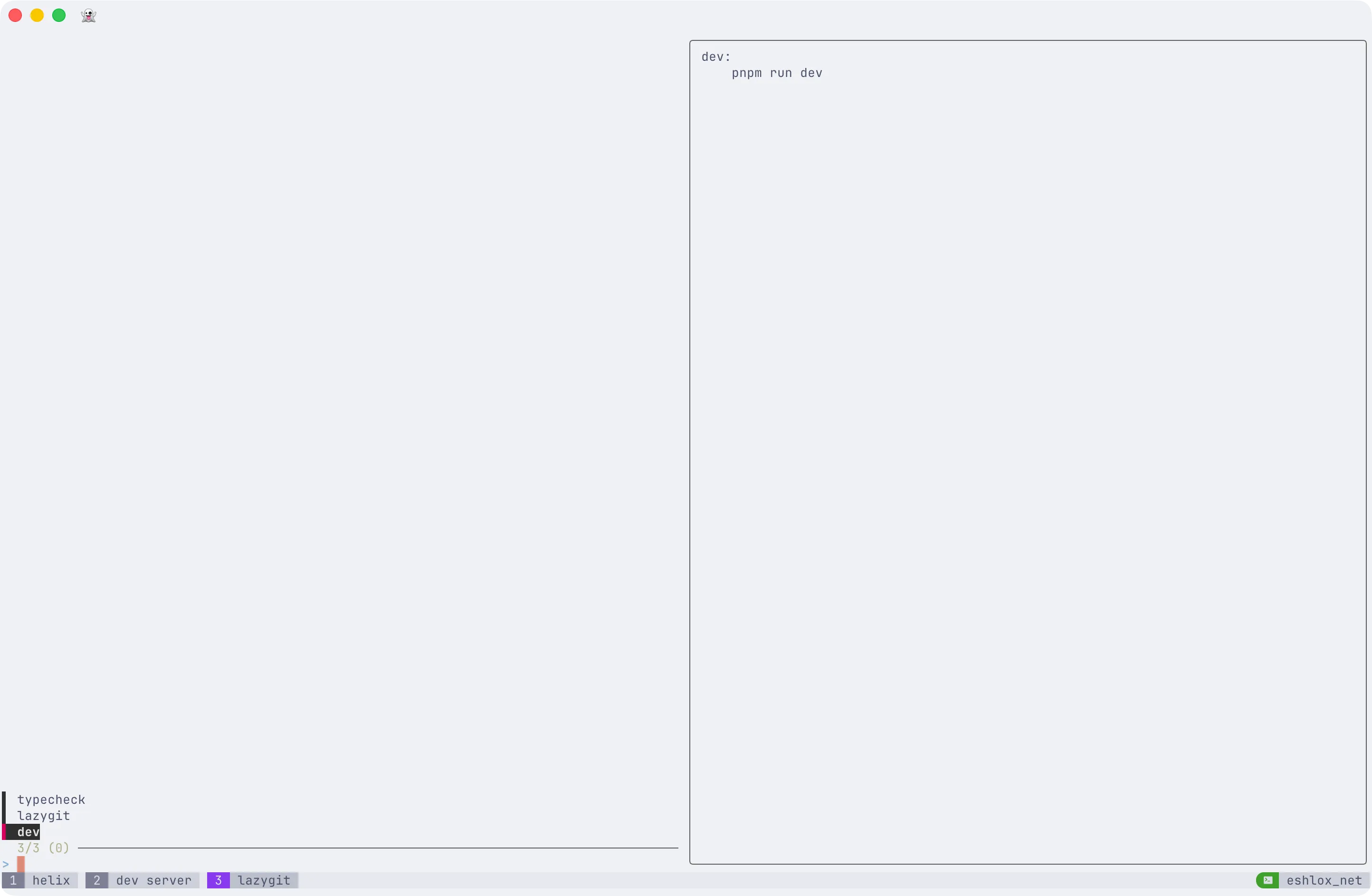
I alias it in my .zshrc:
alias j="just --choose"Now j opens a TUI with all your project commands. In my tmux workflow, I create a new window with t dev, type j, pick a command, and I am running. No extra tooling required.
Example justfile
Here is a trimmed-down version of what I use in a typical project with an AdonisJS backend and React frontend:
# Load environment variables from .envset dotenv-load
# Default recipe: show available commandsdefault:    @just --list
# ---------- Development ----------
# Start the backend dev serverdev:    node ace serve --watch
# Start the frontend dev serverdev-front:    cd frontend && npm run dev
# Run both in paralleldev-all:    #!/usr/bin/env bash    trap 'kill 0' EXIT    just dev &    just dev-front &    wait
# ---------- Database ----------
# Run pending migrationsmigrate:    node ace migration:run
# Rollback last migration batchmigrate-rollback:    node ace migration:rollback
# Seed the databaseseed:    node ace db:seed
# Fresh database: rollback everything, migrate, seeddb-fresh: migrate-rollback migrate seed
# ---------- Code Quality ----------
# Type-check the projecttypecheck:    npx tsc --noEmit
# Lint with auto-fixlint:    npx eslint . --fix
# Run teststest *args:    node ace test {{args}}
# ---------- Infrastructure ----------
# Deploy to stagingdeploy-staging:    railway up --environment staging
# Deploy to production (requires confirmation)deploy-prod:    @echo "Deploying to PRODUCTION. Press Ctrl+C to cancel."    @sleep 3    railway up --environment production
# Run OpenTofu planinfra-plan env="staging":    cd infra && tofu plan -var-file={{env}}.tfvars
# Run OpenTofu applyinfra-apply env="staging":    cd infra && tofu apply -var-file={{env}}.tfvars
# ---------- Utilities ----------
# Open a REPL with the app context loadedrepl:    node ace repl
# Generate a new migrationmake-migration name:    node ace make:migration {{name}}
# Generate a new controllermake-controller name:    node ace make:controller {{name}}
A few things to notice:
The default recipe runs just --list, so typing just with no arguments shows you all available recipes with their comments. The comments above each recipe become the descriptions in the list output.
The db-fresh recipe depends on three other recipes and runs them in sequence. Simple dependency chaining without any special syntax.
The test recipe uses *args to pass through any extra arguments, so just test --tags=unit works as expected.
The infra-plan recipe has a default parameter, so just infra-plan targets staging and just infra-plan production targets production.
Getting started
Install it (macOS: brew install just, or check the repo for other platforms), create a justfile in your project root, add a few recipes, and run just --choose. That is the whole pitch.
No config files to maintain. No learning curve worth mentioning. Just a file with your commands in it, and a fuzzy finder to pick them.
Spot something wrong?
Found a typo, a broken link, or something that could be better? I would love to hear from you. Drop me a message and I will fix it.