Add a language switcher to Storybook
Do you want to add a language switcher to Storybook that looks like this?
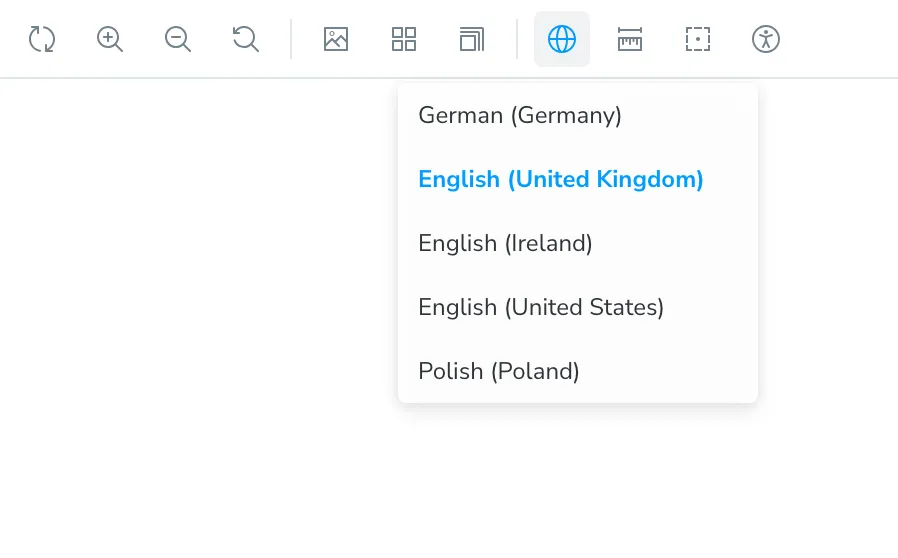
It’s easy to do! Edit the .storybook/preview.ts file and add the following code:
import { setLocale } from "@my-app/i18n"; // import a function to set the localeimport { Preview } from "@storybook/your-framework"; // import the Preview type for your framework
const preview: Preview = {  decorators: [    (story, context) => {      const { locale } = context.globals; // get the locale from the global context      setLocale(locale); // set the locale      return story();    },  ],};
export const globalTypes = {  locale: {    name: "Locale",    description: "Internationalization locale",    defaultValue: "en-GB",    toolbar: {      icon: "globe",      items: [        { value: "de-DE", title: "German (Germany)" },        { value: "en-GB", title: "English (United Kingdom)" },        { value: "en-IE", title: "English (Ireland)" },        { value: "en-US", title: "English (United States)" },        { value: "pl-PL", title: "Polish (Poland)" },      ],      showName: true,    },  },};
export default preview;
This will add a language switcher to your Storybook toolbar. 🎉
You can read more about toolbars and globals in the official Storybook documentation.
Spot something wrong?
Found a typo, a broken link, or something that could be better? I would love to hear from you. Drop me a message and I will fix it.