How to install NPM package in a home directory (PyCharm)
I don’t like to install things as a root user. If it’s possible to install something in my home directory, why not use it?
I use PyCharm for programming and for example to validate JavaScript code it needs the ESLint package. Let’s install ESLint in home directory and make it globally accessible.
First, we need to tell NPM that it should install everything in ~/.npm
directory.
npm config set prefix '~/.npm'Now every time when you install NPM package using -g option it will
install it in ~/.npm directory. You don’t need the root access to do it.
All executables will be in ~/.npm/bin directory. For example if I install
ESLint using npm install -g eslint command then it will be possible to
run eslint command from terminal using full path:
~/.npm/bin/eslintIt’s inconvenient, right? It’s better to be able to use just eslint
command. To achieve that we need to modify ~/.bash_profile file.
Find in this file line which starts with PATH= and add ~/.npm/bin
at the end of the line. In my ~/.bash_profile file it looks like this:
PATH=$PATH:$HOME/.local/bin:$HOME/bin:~/.npm/binIf the line with PATH doesn’t exist then you can add it:
PATH=$PATH:~/.npm/binNow you need to apply changes.
source ~/.bash_profileAnd it’s done. You should be able to run eslint without specifying the full
path to the file.
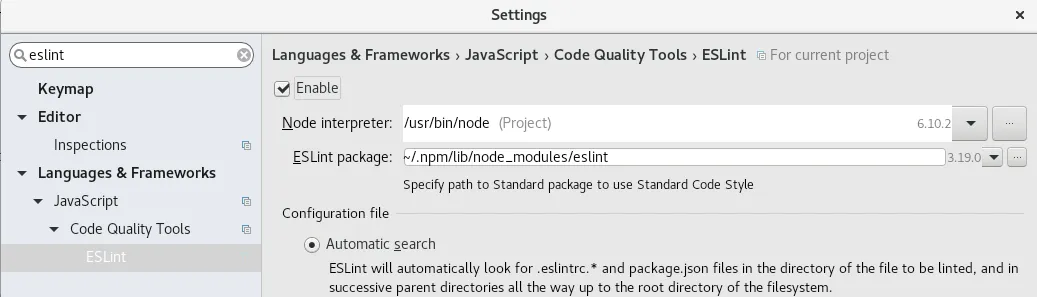
Quick tip about PyCharm. PyCharm needs a full path to the ESLint directory,
not to ESLint executable file. In settings you need to use
~/.npm/lib/node_modules/eslint path.
Spot something wrong?
Found a typo, a broken link, or something that could be better? I would love to hear from you. Drop me a message and I will fix it.